ReplyHunter vs Tweet Hunter:
Which One Do You Need?
Tweet Hunter writes and schedules your posts. ReplyHunter shows you which posts are worth replying to before you write a word.
The Short Answer
They solve different problems. If your content is ready but your replies keep dying at 40 views, you need ReplyHunter. If you need help producing content at volume, you need Tweet Hunter.
The comparison at a glance
| ReplyHunter | Tweet Hunter | |
|---|---|---|
| What it does | Scores posts so you know which are worth replying to | Writes, schedules, and recycles your posts |
| Category | Reply targeting | Content creation and scheduling |
| Writes content for you | No. Your replies, your words | Yes. AI-written tweets and threads |
| Posts on your behalf | Never | Yes. Auto-plugs, auto-retweets, auto-DMs |
| Access to your account | None required | Full account access via X login |
| How it works | Browser extension adds live tags while you browse X | Web app plus sidebar extension |
| Platforms | Chrome, Firefox | Web, Chrome |
| Price | Free during Early Access, no credit card | $29 to $200 per month, 7-day trial |
What Tweet Hunter does well
Tweet Hunter is one of the most complete content suites for X. It earns its place in most tool roundups.
- A library of over 12 million high-performing posts for inspiration.
- An AI writer that drafts tweets and threads in your style.
- Scheduling, evergreen reposting, and auto-plugs that run without you.
- A CRM for tracking accounts you want to build relationships with.
If your bottleneck is producing enough content, it is a fair choice.
What ReplyHunter does differently
Tweet Hunter helps you produce more. ReplyHunter helps you waste less.
Replies are how small accounts grow. But most replies go to posts that have already peaked. The reply is fine. The post is dead. Nobody sees it.
ReplyHunter reads the room before you spend effort. As you browse X, it tags posts with live signals with the reach your reply could realistically get.
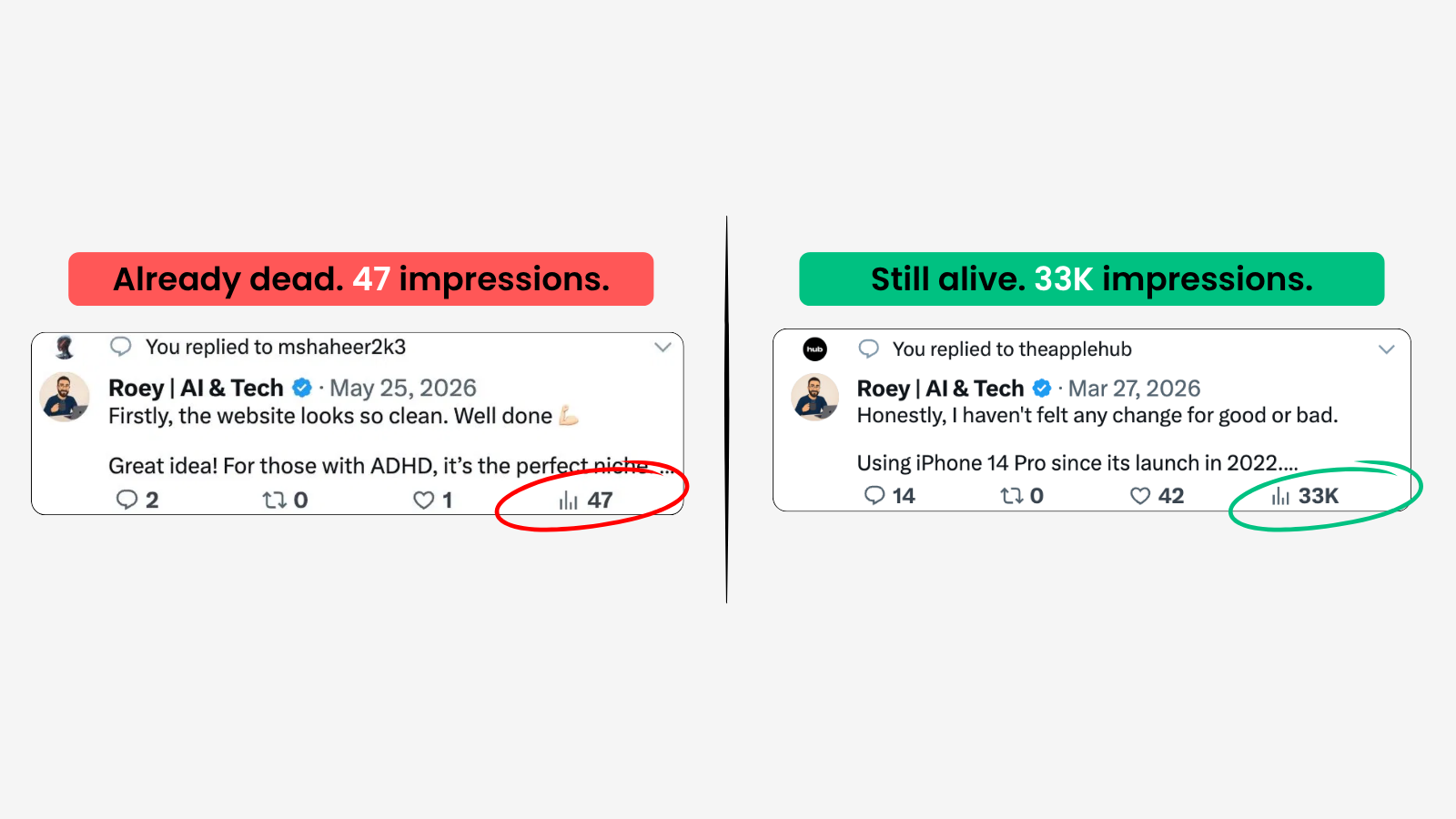
The difference is the post, not the reply.
In our reference scenario, the same reply earned 47 views on one post and 33K impressions on a better one. Same words. Different target.
One more difference: ReplyHunter never writes for you, never posts for you, and never touches your account. With X actively deprioritizing detected AI-generated replies, keeping your own voice is not just a preference. It is protection.
When to use which
Tweet Hunter
You post daily, need volume, and want scheduling and recycling handled for you. You are a content-first creator.
ReplyHunter
You grow through conversations. You already know what to say. Your problem is choosing where to say it.
Use Both
Tweet Hunter fills your queue. ReplyHunter makes sure your reply time lands where it counts. They do not overlap.
Frequently Asked Questions
Is ReplyHunter an alternative to Tweet Hunter?
Not a direct one. Tweet Hunter is a content creation suite. ReplyHunter is a reply targeting tool. People compare them because both help you grow on X, but they solve different problems. Many users run both.
Does ReplyHunter write replies for me?
No. ReplyHunter never generates content. It shows you which posts are worth your time and what reach to expect. Your replies, your words, your control.
Can I use ReplyHunter and Tweet Hunter together?
Yes. There is no conflict. Tweet Hunter manages what you publish. ReplyHunter guides where you engage. The two workflows never touch.
What does ReplyHunter cost?
ReplyHunter is free during Early Access. No credit card required. Tweet Hunter starts at $29 per month after a 7-day trial.
Does ReplyHunter post anything on my behalf?
No. It does not access your account, read your DMs, or post for you. It runs entirely in your browser while you use X normally.
Know before you reply
Stop guessing which posts deserve your effort. ReplyHunter tags the opportunities that are still climbing, before you write a word.
 Add to Firefox